Test or reset Smart Hub Freestyle projector
Just like on Samsung TVs, the Smart Hub gives you access to streaming services, apps, and more. The Connection Test diagnoses problems you might have with your Smart Hub connection, like when the internet is down.
-
To perform one, press and hold Home on The Freestyle’s remote until the quick settings menu appears. Select All Settings, and select Support.
-
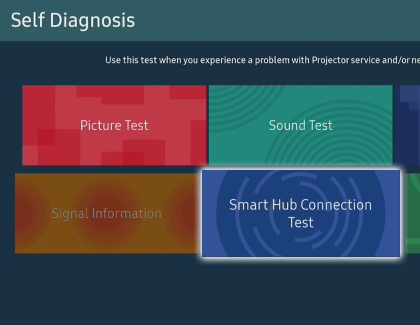
Select Device Care, and then select Self Diagnosis.
-
Select Smart Hub Connection Test.
-
If no problems are detected, select Close after the test is complete. If any problems are detected, please review the on-screen instructions.
-
If you are still experiencing issues with Smart Hub, you may want to try resetting the Hub. Navigate back to the Self Diagnosis page.
-
Select Reset Smart Hub, and then enter your PIN (the default PIN is 0000). After the reset is complete, select OK.
https://www.samsung.com/