
If The Freestyle is not connecting to the internet, you can use the built-in Network Status test to identify where the problem is occurring. This test helps determine whether the issue is with the projector, your home router, or your internet service provider (ISP).
Follow the steps below using The Freestyle remote control.
Step-by-Step Instructions

- Turn on The Freestyle projector.
Make sure the projector is powered on and showing the main screen. - Open the Quick Settings menu.
On the remote, press and hold the Home button until the quick settings menu appears on the screen. - Select All Settings.
In the quick settings menu, navigate to and select All Settings to open the full settings menu. - Go to Connections.
In the Settings menu, select Connections. - Open Network settings.
Under Connections, select Network. - Select Network Status.
Choose Network Status to begin the network test. - Wait for the test to complete.
The projector will automatically check the connection path and display the results on screen. - Review the results.
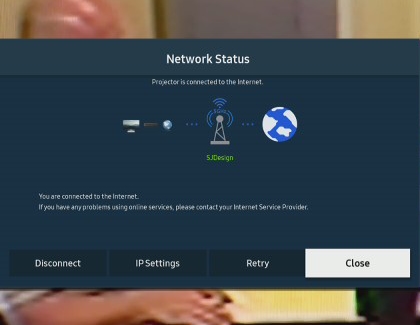
Once the test is complete, the screen will show the status of the network connection between:- The projector
- The router
- The internet
How to Read the Network Status Results

The Network Status screen uses icons and connection lines to show where the connection problem is happening.
- If there is an X between the projector and the router:
This usually means the issue is with either The Freestyle projector or your home network setup. The projector may not be properly connected to Wi-Fi, or the router may not be communicating with the projector correctly. - If there is an X between the router and the Earth icon (internet):
This means the issue is likely between your home network and your internet service provider (ISP). In this case, your router may be working, but the internet connection itself is unavailable.
Helpful Tip
If you need more troubleshooting help after running the test, refer to Samsung’s support guide for Freestyle won't find or connect to my Wi-Fi network for more detailed solutions.
Summary
Running the Network Status test is one of the quickest ways to find out why The Freestyle is not connecting to the internet. By following the settings path and checking where the X appears, you can tell whether the problem is with the projector, the router, or the internet service itself.